
Compare the video controls available in VidFlow AI before choosing a provider. Both integrations belong to Free. Bring your own API keys; video usage is billed by each provider.
Content reviewed: October 27, 2026. Model choices depend on your installed plugin version.
Compare the controls
Hailuo / MiniMax
Choose a Hailuo model and output resolution. Prompt Optimizer lets the provider expand your written prompt.
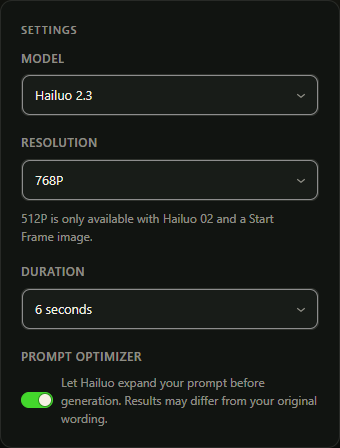
- ModelsHailuo 2.3, Hailuo 2.3 Fast and Hailuo 02.
- FramingNo separate aspect-ratio selector. Check the selected model’s Start Frame requirements.
- Duration6 or 10 seconds.
- Resolution768P or 1080P; 512P with eligible Hailuo 02 settings.
- AudioNo native audio control in this integration.
Choose Google video generation for native audio, optional Start Frame guidance, and output up to 4K.
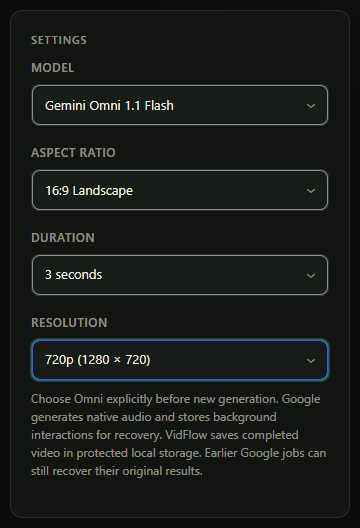
- ModelsGemini Omni 1.1 Flash (
gemini-omni-1.1-flash). - Framing16:9 landscape or 9:16 portrait.
- DurationWhole seconds from 3 to 10 at every resolution.
- Resolution360p, 720p (the ordinary Create Video default), 1080p (upscaled) or 4K (upscaled).
- AudioNative audio is generated with the video.
Start and End Frame support
A Start Frame gives the model an opening image. An End Frame also guides the final image of the shot. These controls depend on the provider and model; selecting a reference can also change the available settings.
- Hailuo: Hailuo 2.3 Fast requires a Start Frame. End Frame is available only with Hailuo 02 and is unavailable at 512P.
- Google: Start Frame is optional. End Frame requires a Start Frame in Single or ordinary Batch. Bound Product Video drafts keep their frame controls locked and do not offer End Frame.
Read the Start and End Frame guide for image selection and preparation.
Resolution and duration combinations
- Hailuo: 1080P is unavailable for 10-second videos. 512P requires Hailuo 02 with a Start Frame and no End Frame. Prompt Optimizer may change your prompt’s wording.
- Google: Gemini Omni 1.1 Flash supports every whole-second duration from 3 to 10 at 360p, 720p, 1080p (upscaled) and 4K (upscaled).
Before you generate
- Connect the right account. Hailuo uses a MiniMax API key; Google uses a Google AI Studio API key. Check model access, billing and quota in your provider account.
- Review the selected settings. Check the model, prompt, images, duration, resolution and audio. Provider pricing, credits and rate limits are separate from your VidFlow plan.
- Check local storage for Google. Google results must be copied to protected local Media Library storage before completion, even when optional storage is off. If retrieval is pending, inspect the existing request before submitting another paid generation.