
Content reviewed: October 27, 2026.
Google video integration is included in Free. Gemini product prompt/image tools belong to Pro. YouTube publishing uses independent OAuth authorization.
Before setup
- Install a Free package that includes Google and open its connector in Settings.
- Create your own Google AI Studio key and enable the billing and model access required by Google.
- Check available space in WordPress uploads and make sure your site can save video files. Google videos require protected local storage.
Save your key and choose a model
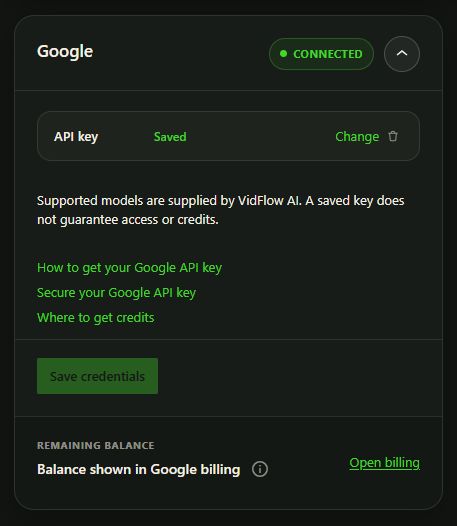
- Open VidFlow AI > Settings and expand Google.
- Follow the Google key guide and save your own API key.
- In Create Video, choose Google and select Gemini Omni 1.1 Flash (
gemini-omni-1.1-flash). Update the plugin to get changes to the supported model list.
Check API access, billing, region availability, credits and quota in your Google account.
Pro Gemini image tools use Gemini Nano Banana 2.1. Use Check model access to check that image model. Check Google video access separately in your Google account.
Choose supported video settings
- 16:9 landscape or 9:16 portrait.
- Whole-second durations from 3 to 10 seconds at every resolution: 360p, 720p, 1080p (upscaled) or 4K (upscaled). Ordinary Create Video defaults to 720p.
- Optional Start Frame; End Frame is available with a Start Frame in Single or ordinary Batch. Product-bound drafts do not offer End Frame.
- One video with native audio per submitted request.
Storage and submission
Review the prompt, model, duration, aspect ratio, resolution and optional image before Generate. WordPress submits those inputs to Google. Each completed result is retrieved with authentication and saved to protected local Media Library storage. Turning optional storage off does not bypass Google ingestion.
A provider operation can succeed while local retrieval is still pending or blocked. Inspect the saved operation, disk/write access and server download limits before submitting a new paid generation.
Shared key and separate YouTube setup
The native Google key is shared locally with compatible Pro Gemini tools. Changing or removing it affects Google video generation, Gemini prompt writing and Gemini opening images. WordPress-managed prompt sources remain separate. Read the Pro setup guide.
Connecting Google video generation does not connect YouTube. Configure YouTube OAuth separately.