
Fix failed optional imports of completed videos into the WordPress Media Library.
Content reviewed: October 27, 2026.
When import runs
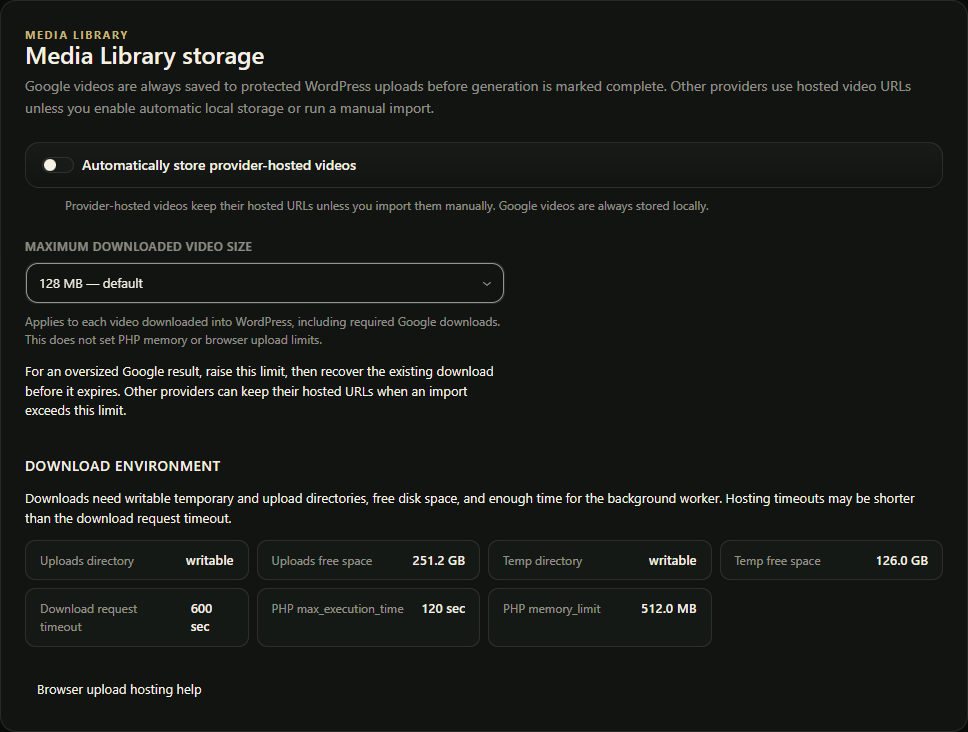
For Hailuo, import runs when optional Media Library storage is enabled or a manual import path is used. Their provider generation can succeed even if this optional import fails.
Common blockers
- Provider media URL expired.
- Server cannot fetch provider URL.
- HTTP timeout.
- PHP memory limit.
- Temporary disk or uploads disk is full.
- The per-video WordPress download cap is too low. Its default is 128 MB when no valid saved limit exists; a positive saved limit remains.
- File type or size rejected by WordPress or hosting.
What still works
- Playback can still use provider-hosted URLs when available.
- Downloads can still use provider URLs when reachable.
- Future jobs can import after server limits or settings are fixed.
Fix path
- Check Media Library storage settings.
- Confirm the provider URL still works.
- Review server disk and PHP limits.
- Try any existing local copy or supported saved-media retrieval first. Submitting a new generation after an expired provider URL is a separate paid choice.
Google video storage requirements
Google requires protected local ingestion before completion. Provider success without a saved local file does not complete the WordPress job. Check disk space, write access, download limits and the saved operation’s retrieval state before choosing a new paid generation.