
Decide whether generated videos should remain provider-hosted by default or be imported into protected WordPress uploads.
Content reviewed: October 27, 2026.
We recommend publishing completed videos to YouTube before embedding and selecting its published player to reduce video bandwidth and playback load on your WordPress hosting.
Default storage
By default, Hailuo videos use the provider-hosted media URL. They do not consume WordPress uploads disk space unless you enable local storage or manually import them.
Optional Media Library storage
- When enabled, VidFlow AI attempts to import each completed video into WordPress uploads.
- Local copies are attached to the Media Library.
- Protected local playback and download use short-lived signed URLs.
- Provider-hosted URLs may remain usable when local storage is disabled, pending, or blocked, but they can expire. A saved job record does not guarantee a recoverable file.
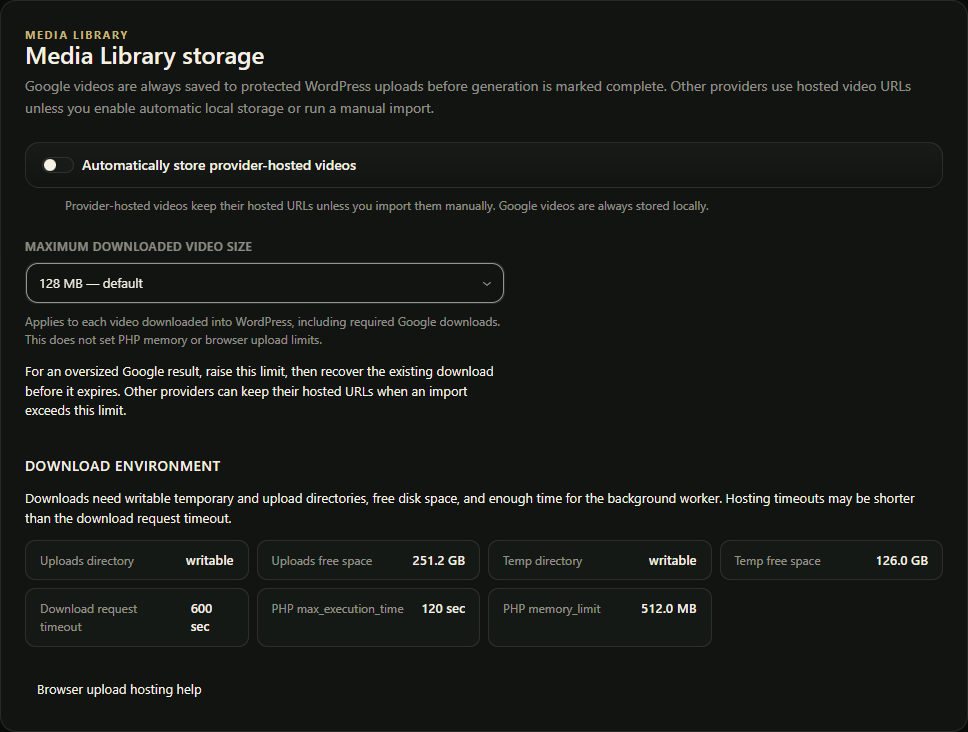
With no valid saved limit, the per-video WordPress download cap is 128 MB. A previously saved positive limit, such as 256 MB, remains in effect. Browser uploads and hosting/PHP limits are separate. If an oversized Google download is blocked, raise this limit and recover the existing download before its provider file expires.
When to enable it
- You want WordPress to keep local protected copies.
- Provider-hosted URLs expire too quickly for your workflow.
- You want more control over playback and download retention.
- Your hosting can handle the disk, memory, timeout, and upload requirements.
When to leave it off
- You want to avoid filling uploads storage.
- Provider-hosted playback is sufficient.
- Your server has tight disk, memory, or timeout limits.
Google storage requirement
Google media links require authenticated retrieval and are short-lived. The Google integration downloads each completed result to protected local Media Library storage before marking the job complete. Disabling optional storage does not bypass this requirement. Check available uploads disk space and server download/ingestion limits before using Google.
Pro merged output
Completed browser merges are saved in protected local storage. Check that your hosting and CDN rules protect access to these files.
After publishing a completed merged output to YouTube, Pro can offer Delete website copy in its gear menu. Save a backup and confirm that the published video works. VidFlow checks ownership and managed dependencies before removing only the local output file; it keeps the merged record, original clips, poster and VidFlow embeds using the accepted YouTube player.
Local downloads, reuse as a merge source and another upload need the original file. Direct links to the WordPress video file stop working. This storage action applies to Pro merged outputs; Google Library videos still require their local copy. Follow the merged-video storage steps.